

Dynamic DNS guide
What is Dynamic DNS, and how does it work?
Dynamic DNS, or DDNS, keeps a domain or hostname pointed at the right device even when the public IP address changes. It is especially useful for home servers, office networks, cameras, VPNs, and other self-hosted services.
example.com to an IP address.
Why Dynamic DNS exists
Standard DNS works beautifully when a server keeps the same public IP address. The trouble starts when an ISP changes that address. If your website, VPN, remote desktop host, NAS, or camera system is still tied to the old IP, visitors and devices can no longer reach it.
Dynamic DNS solves that by updating the DNS record whenever the public IP changes, so people keep using the same hostname while the address underneath stays current.
How Dynamic DNS works
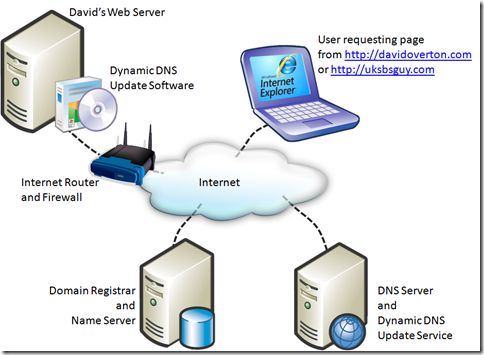
- 1. You choose a hostname Create a hostname or use your own domain for the service you want to reach.
- 2. A client watches your IP Your router, update client, or script checks whether the public IP address has changed.
- 3. DNS is updated automatically When the IP changes, the DDNS service updates the DNS record so the hostname keeps pointing to the right place.
When Dynamic DNS is useful
- Hosting a website, lab, or development server from home or a small office.
- Connecting back to a VPN, NAS, remote desktop host, or camera system.
- Keeping a self-hosted email, FTP, or monitoring service reachable after ISP IP changes.
- Using a memorable hostname instead of repeatedly looking up a changing public IP address.
When Dynamic DNS is not enough
Dynamic DNS keeps the name current, but it does not open a route into a network that blocks inbound traffic. If port forwarding is unavailable or your ISP uses CGNAT, start with Dynamic DNS vs Public Tunnel or What is CGNAT? before troubleshooting the updater itself.
Do you need Dynamic DNS if you have a static IP?
Usually not. If your public IP address is truly static, a normal DNS record can keep pointing at it without automation. Dynamic DNS matters when the address can change and you want the hostname to follow it automatically.
Start with free Dynamic DNS
DNSExit offers free Dynamic DNS for your own domain or a free second-level domain, plus router setup guides, update clients, scripts, and a DNS API when you want more control.